
An Ultimate ABDM Integration Checklist for Healthcare Providers (2026)
If your hospital is still not ABDM integrated, it will start affecting your operations. You may see slower insurance claims, more rejections, and delays in handling patient data. This is happening because the government is actively pushing ABDM integration across India, making an ABDM Integration Checklist essential for every hospital.
Patient records are expected to be shared securely using ABHA IDs and consent. Hospitals that are not prepared are already facing workflow issues.
The problem is not awareness. Most hospitals know about ABDM. But they are not clear on how to implement it.
They have so many questions like
- Where to start
- What needs to be done first
- What M1, M2, and M3 actually mean
- How systems, APIs, and consent work together
This creates confusion and delays. But not any more!
This guide will help you solve that.
In this blog, you will learn a complete ABDM integration checklist, its purpose, benefits, and steps to implement it correctly.
What Is Ayushman Bharat Digital Mission (ABDM)?
The Ayushman Bharat Digital Mission (ABDM) is a Government of India initiative launched on September 27, 2021, to create a secure and connected digital healthcare system.
It is managed by the National Health Authority (NHA) and connects hospitals, doctors, labs, and patients on one platform.
ABDM allows health records to be stored digitally and shared between providers using ABHA ID, but only with patient consent.
Along with this, ABDM includes key components like:
- Health Facility Registry (HFR) for hospitals
- Healthcare Professionals Registry (HPR) for doctors
- Consent-based data sharing system
This makes healthcare more connected, transparent, and efficient, while keeping patient data secure and under their control.
Key Objectives of ABDM
- Build a Connected Digital Health System: Create a unified infrastructure where hospitals, labs, and doctors can exchange health data smoothly.
- Provide a Unique Health ID (ABHA) for Every Patient: Assign a 14-digit ABHA number so patients can store and access their health records digitally.
- Maintain Verified Registries (HFR & HPR): Ensure accurate databases for healthcare facilities and professionals to build trust and standardization.
- Ensure Secure and Consent-Based Data Sharing: Allow health data to be shared only with patient approval, keeping privacy and security at the core.
- Enable Seamless Interoperability Across Systems: Make different hospital systems and ABDM compliant software work together without data loss or mismatch.
- Improve Access to Healthcare Services: Support services like teleconsultation and digital access to make healthcare more reachable and affordable.
- Enhance Efficiency and Decision-Making: Use structured health data to reduce errors, improve workflows, and support better healthcare planning.
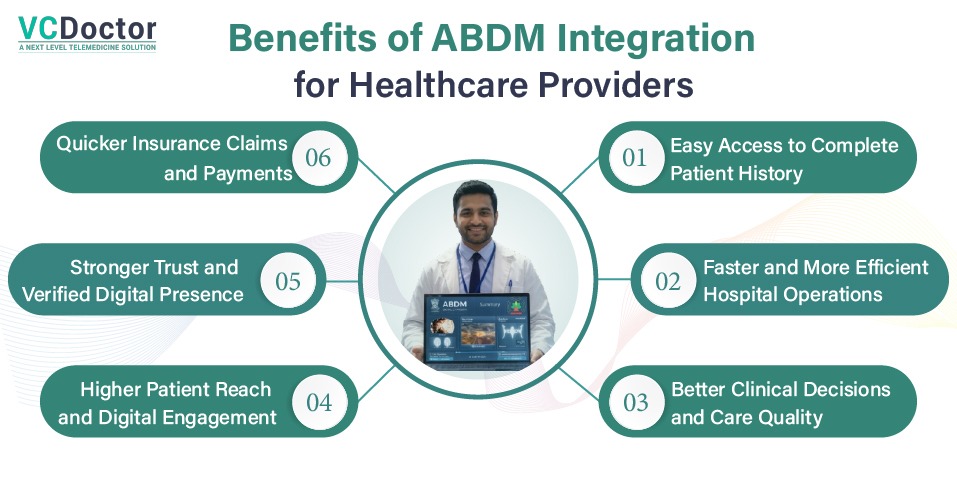
6 Benefits of ABDM Integration for Healthcare Providers
Here are the key benefits you will actually experience once your hospital is properly integrated with ABDM:
1. Easy Access to Complete Patient History
You no longer have to depend on patients carrying files or remembering past treatments. With ABDM, you can access their medical history across different providers using the ABHA ID. This includes past prescriptions, lab reports, and discharge summaries. It saves time during consultation and gives doctors the full context before starting treatment, which leads to better and faster decisions.
2. Faster and More Efficient Hospital Operations
Manual processes slow everything down. Repeated data entry, disconnected systems, and paperwork create delays. With ABDM integration, data flows across departments automatically. Registration, appointment management, billing, and discharge become more streamlined. This reduces workload on staff, improves coordination, and helps your hospital handle more patients efficiently.
3. Better Clinical Decisions and Care Quality
When doctors have access to a patient’s complete medical background, they can avoid guesswork. They can see previous diagnoses, ongoing treatments, allergies, and medications. This reduces the chances of errors, avoids unnecessary tests, and improves treatment accuracy. Over time, this directly improves patient outcomes and trust in your services.
4. Quicker Insurance Claims and Payments
Delayed and rejected claims are a major challenge for many hospitals. ABDM helps by standardizing patient data and making it digitally available. When records are structured and easy to verify, insurers can process claims faster. This reduces back-and-forth communication, lowers rejection rates, and improves your hospital’s cash flow.
5. Stronger Trust and Verified Digital Presence
Once your hospital and doctors are registered under HFR and HPR, you become part of a verified national healthcare network. This increases your credibility. Patients feel more confident choosing a facility that is officially recognized and digitally connected. It also helps in partnerships with insurers and government schemes.
6. Higher Patient Reach and Digital Engagement
ABDM expands your visibility beyond your local area. Through platforms like UHI, patients can discover your services, book consultations, and connect digitally. This is especially useful for teleconsultation and follow-ups. It not only improves patient engagement but also helps you reach more patients without increasing physical infrastructure.
ABDM Integration Checklist 2026
ABDM integration is not a one-step setup. It is a structured process that moves from registration to full data exchange and compliance.
Each stage builds on the previous one. If you follow the correct sequence, implementation becomes predictable and manageable.
If you skip or rush steps, it leads to integration failures, data issues, and compliance risks.
Below is a complete, practical ABDM Integration checklist that gives you a clear path from start to full ABDM readiness.
1. Preparation and Registration
Everything starts here. Without proper registration, nothing else will work.
First, register your hospital on the Health Facility Registry (HFR). This gives your facility an official digital identity. Without this, you cannot proceed.
Then register all your doctors and staff on the Healthcare Professionals Registry (HPR). Each person gets a verified ID. This is important because ABDM only works with authenticated entities.
Now comes a step most hospitals overlook.
You need to connect with the ABDM Sandbox or Gateway and get your:
- Client ID
- Client Secret
These are your system’s credentials to interact with ABDM APIs.
If this setup is weak, everything that follows will break.
2. M1 – ABHA Creation and Patient Linking
You need to enable ABHA ID creation and verification at your hospital. Patients should be able to generate their ABHA ID using Aadhaar or a mobile number with OTP verification.
But creating ABHA is not enough.
You must link the ABHA ID with your internal patient records. This means every patient record in your system should be mapped correctly to their ABHA.
This step is critical because all future data exchange depends on this link. If ABHA is not properly connected, records will not sync correctly, and your integration will break at later stages.
From a workflow point of view, your front desk staff must be trained to:
- Ask for ABHA during registration
- Create one if the patient does not have it
- Ensure it is correctly linked in the system
This is where ABDM starts becoming part of your daily operations.
3. M2 – Health Information Provider (HIP)
Now your hospital moves from identity setup to actual data handling.
At this stage, your system must be able to:
- Link medical records such as prescriptions, lab reports, and discharge summaries
- Attach these records to the patient’s ABHA ID
- Share this data securely using ABDM APIs
This makes your hospital a Health Information Provider (HIP).
But this step is not just about sending data. It is about sending structured and usable data.
Your system must:
- Organize data in a standard format
- Map internal fields correctly
- Ensure no missing or inconsistent values
This is where many hospitals face problems. If your data is not structured properly, it cannot be understood by other systems, which breaks interoperability.
For example, if lab results or prescriptions are not mapped correctly, they may not appear properly when shared with another provider.
So at this stage, focus on:
- Clean data entry
- Correct mapping
- Reliable API integration
Once done right, your hospital becomes a trusted data source in the ABDM network.
4. M3 – Enable Consent-Based Data Access
This is the most important and sensitive part of ABDM integration.
Now your hospital should be able to access patient data from other providers, but only with patient permission.
This is done through the ABDM Consent Manager.
Your system must be able to:
- Send consent requests to patients
- Receive approval or rejection
- Validate consent before accessing any data
This is called Health Information User (HIU) functionality.
The key rule here is simple.
No consent, no data access.
Your system must also maintain records of:
- When consent was given
- What data was accessed
- Who accessed it
If consent workflows are not implemented properly, your hospital is not compliant, even if everything else is working.
5. Technical and Compliance Requirements (Make Your System Reliable)
Once M1, M2, and M3 are in place, you need to ensure your system meets technical and security standards.
The most important requirement is a FHIR-based data structure. This means your data should follow a standard format so it can be shared and understood across different systems without errors.
You also need:
- secure API communication with proper authentication
- encryption to protect sensitive patient data
- validation mechanisms to avoid incorrect data exchange
- audit logs to track every data transaction and consent activity
These requirements ensure that your system is not only functional but also secure and compliant with national standards.
6. Testing and Certification (Validate Before Going Live)
Before using real patient data, you must test everything thoroughly.
All testing is done in the ABDM Sandbox environment.
Here, you should:
- Test ABHA creation and linking
- Validate data sharing workflows
- Check consent request and approval flow
- Identify and fix errors
You need to simulate real scenarios to ensure your system behaves correctly.
Once testing is complete, you must go through:
- functional testing validation
- Web Application Security Assessment (WASA)
After successful evaluation, you will receive approval to move to the production environment.
This step ensures that your system is ready for real-world usage without risks.
7. Go Live and Operational Readiness
After certification, you move to the live environment.
Now your system will handle real patient data and real interactions.
At this stage, your focus should be on smooth operations.
Your staff must clearly understand:
- How to create and verify ABHA
- How to link records correctly
- How to request and manage consent
- How to handle digital workflows daily
Without proper training, even a fully integrated system will fail in practice.
You should also continuously monitor:
- system logs
- failed transactions
- missing or incorrect data
This helps you fix issues early and maintain a stable system.
Have Questions About ABDM Integration?
Our team is here to help you understand requirements and get started.
Schedule a Meeting NowFinal Go-to ABDM Integration Checklist for Quick Review
Before you consider your ABDM integration complete, go through this ABDM Integration checklist carefully:
- Your facility is registered on HFR
- All doctors and staff are registered on HPR
- ABHA creation and verification are enabled
- Every patient record is linked with ABHA
- Your system supports ABDM APIs
- Data is structured using FHIR standards
- Health records are being shared correctly (M2)
- Consent management system is fully implemented (M3)
- Sandbox testing is completed without major issues
- Certification and security assessment are approved
- Your system is live in the production environment
- Staff are trained, and workflows are aligned
6 Common ABDM Integration Mistakes (And How to Fix Them)
Here are some common mistakes hospitals face during ABDM integration, along with their ABDM integration solutions:
Challenge 1. Incorrect ABHA Creation Due to Aadhaar Mismatch
A very common issue happens during ABHA creation. If patient details like name, date of birth, or gender do not exactly match Aadhaar records, the system either throws errors or creates duplicate problems. In some cases, patients end up with multiple ABHA attempts, which creates confusion and data inconsistency later.
Solution: Always validate patient details before initiating ABHA creation. Train your front desk to check Aadhaar-linked information carefully and avoid manual mistakes. Also, encourage patients to search and retrieve an existing ABHA instead of creating a new one, since only one ABHA per individual is allowed.
Challenge 2. ABHA Not Properly Linked with Patient Records
Many hospitals complete ABHA creation but fail to link it correctly with their internal patient ID. This results in records not syncing properly, incomplete data exchange, and failed sharing across systems. Over time, this creates duplicate or disconnected patient records.
Solution: Make ABHA linking a mandatory part of your registration workflow. Ensure every patient record is mapped correctly and consistently used across all visits, reports, and documents. Your system should not allow records to be created without proper ABHA mapping.
Challenge 3. Poor Data Structuring and FHIR Mapping Issues
ABDM works on standardized data formats. If your system stores data in inconsistent or incomplete formats, it cannot be shared properly. For example, missing fields, incorrect formats, or unstructured reports can lead to failed data exchange or unreadable records on the receiving side.
Solution: Ensure your system follows proper FHIR standards for structuring health data. Work with your vendor or technical team to map all fields correctly. Focus on clean data entry, correct formats, and complete records so your data can move smoothly across systems.
Challenge 4. API and Callback Handling Errors
ABDM integration depends heavily on APIs. If your system does not handle API calls correctly, the entire workflow breaks. Common issues include incorrect endpoint usage, failure to send callback responses on time, or inability to handle real-time requests, especially during consent or data sharing.
Solution: Build a stable API layer that can handle real-time communication. Ensure all callbacks are processed within the required time limits and responses are properly acknowledged. Test every API flow multiple times in the sandbox before going live to avoid runtime failures.
Challenge 5. Weak or Incorrect Consent Management
Consent is not just a feature. It is the core of ABDM. Many hospitals either skip proper implementation or fail to manage it correctly. This leads to blocked data access, compliance issues, and the inability to retrieve patient records from other providers.
Solution: Implement the ABDM Consent Manager properly and ensure your system can handle the full consent lifecycle. Your team should know when to request consent, how to track approvals, and how to validate access before using any patient data. This ensures both compliance and smooth data access.
Challenge 6. Poor Testing and Sandbox Confusion
Some hospitals rush the process and move to production without proper testing. Others mix sandbox and production credentials, which leads to system failures, connection issues, and data inconsistencies once live.
Solution: Use the ABDM sandbox environment to test everything end-to-end. This includes ABHA creation, data linking, data sharing, and consent workflows. Only move to production after full validation, certification, and resolving all major issues.
Technical Requirements for ABDM Integration
Once your M1, M2, and M3 setups are clear, your system must be technically ready to support them. If these basics are not handled properly, data will not flow, APIs will fail, and compliance issues will arise.
Here are the key technical requirements you must ensure:
- Secure Authentication and Access Control: Your system must use secure authentication methods to connect with ABDM APIs. Only authorized systems should be able to send or receive data to prevent misuse or breaches.
- Strong Data Encryption (Security First): Patient data must be protected at all stages. Use encryption for data in transit and at rest to ensure sensitive health information remains secure and compliant.
- FHIR-Based Data Structure (Most Important): All health data must follow FHIR standards. This ensures your patient records, prescriptions, and reports are structured in a way that other systems can understand and use without errors.
- Complete API Integration for M1, M2, M3: Your system must fully support ABDM APIs for ABHA creation (M1), data sharing (M2), and consent-based data access (M3). Without proper API integration, nothing will work.
- Real-Time Callback and Response Handling: Your system must respond to API callbacks within the required time. Delays or missed responses can break workflows like consent approval and data sharing.
- Audit Logs and Activity Tracking: You must track all activities such as data sharing, access requests, and consent actions. This helps in monitoring, troubleshooting, and maintaining compliance.
Real-World Impact of ABDM Integration
Here are the most impactful changes ABDM is already creating in the real world:
1. Faster Patient Registration and Reduced Waiting Time
With features like scan and share using QR codes, patient registration has become much faster. What earlier took 30 to 60 minutes with manual forms can now be done in a few minutes. This reduces long queues at OPD, improves patient flow, and saves significant time for both staff and patients.
2. Access to Complete Patient History Across Hospitals
Doctors can now access a patient’s previous records like prescriptions, lab reports, and discharge summaries, even if they were created at another hospital. This helps in better diagnosis, avoids repeated tests, and ensures continuity of care without depending on physical documents.
3. Faster and More Transparent Insurance Claims
With structured digital records, insurance claims are processed more efficiently. Hospitals no longer need to deal with repeated document submissions and verification delays. This reduces claim rejections and improves cash flow through faster settlements.
4. Better Access to Healthcare in Remote Areas
ABDM has enabled integration with teleconsultation platforms, allowing patients in rural or underserved areas to connect with doctors remotely. This bridges the gap between demand and the availability of healthcare services without requiring physical visits.
5. Verified and Trustworthy Healthcare Ecosystem
With HFR and HPR registries, both hospitals and doctors are verified within a national system. This builds trust among patients and reduces the chances of unqualified providers operating in the system.
6. Data-Driven Healthcare and Smarter Decision Making
ABDM enables real-time collection of anonymized health data. This helps authorities track disease patterns, manage outbreaks, and plan healthcare resources better. It also supports hospitals in improving internal decision-making using structured data.
How VCDoctor Can Help You With ABDM Integration?
ABDM integration is not just about connecting APIs. It needs the right system, structured data, and workflows that actually work in daily hospital operations.
That’s where VCDoctor helps you simplify the entire process.
VCDoctor doesn’t just integrate ABDM; it turns it into a fully working, seamless system across your entire healthcare operations from day one.
Why choose us?
- ABDM-ready system (M1, M2, M3 supported): From ABHA creation to data sharing and consent, everything is already aligned with ABDM workflows.
- FHIR-compliant data structure: Your data is clean, structured, and ready for smooth sharing across systems.
- Seamless EMR/EHR integration: Connect your existing system without data loss, duplication, or manual effort.
- Secure and compliant platform: Built with strong data security, encryption, and healthcare compliance standards.
- Customizable white-label solution: Launch your own branded healthcare platform tailored to your needs.
- End-to-end expert support: From setup to go-live, you get guidance to ensure everything works in real conditions.
Ready to Implement ABDM Without Confusion?
Book your free consultation with our experts today and get complete guidance for seamless ABDM implementation.
Ready to Make Your System ABDM-Compliant?
Get a clear roadmap and expert guidance for seamless integration.
Contact UsConclusion
ABDM integration is no longer optional. It is becoming a core part of how modern healthcare systems operate.
If done right, it improves everything that matters: faster workflows, better patient care, smoother claims, and stronger compliance. But if done incorrectly, it creates more problems than it solves.
The difference lies in following the right approach.
Some hospitals try to handle it on their own and end up facing delays, errors, and rework. On the other hand, smart hospitals take a different route. They work with experienced professionals like VCDoctor who ensure everything is implemented correctly from the start.
We hope this guide helped you clearly understand ABDM integration and how to follow the right ABDM Integration checklist.
Now it’s your turn to take action with clarity and let the experts handle ABDM integration smoothly.
FAQs
1. What is the first step to start ABDM integration for a hospital?
The first step is registering your hospital on the Health Facility Registry (HFR) and your doctors on the Healthcare Professionals Registry (HPR). Without these registrations, your hospital cannot access ABDM APIs or move forward with M1, M2, and M3 integration. This step builds the foundation for everything that follows.
2. What do M1, M2, and M3 mean in ABDM integration?
M1 is about creating and linking ABHA IDs with patient records. M2 enables your hospital to share health data like prescriptions and reports. M3 allows you to access patient data from other providers with consent. Together, these three milestones complete the full ABDM integration workflow.
3. How long does it take to complete ABDM integration?
On average, ABDM integration can take 3 to 6 months, depending on your existing system, data quality, and technical readiness. Delays usually happen when hospitals skip proper planning, data structuring, or testing phases.
4. Is ABDM integration mandatory for hospitals in India?
ABDM integration is not mandatory for all hospitals yet, but it is already required for certain categories like AB-PMJAY empanelled hospitals, AIIMS, and NMC-linked institutions, especially for digital claims. The government is gradually expanding this, so even if it is not compulsory today, it is becoming essential for compliance, faster claims, and smooth operations.
5. Why should hospitals hire experts for ABDM integration instead of doing it in-house?
ABDM integration involves complex steps like API setup, FHIR data structuring, consent workflows, and compliance requirements. Small mistakes can lead to data errors, failed integrations, or compliance issues. Hiring experts helps hospitals implement everything correctly from the start, avoid delays, and ensure smooth, error-free operations in real-world use.